
Description
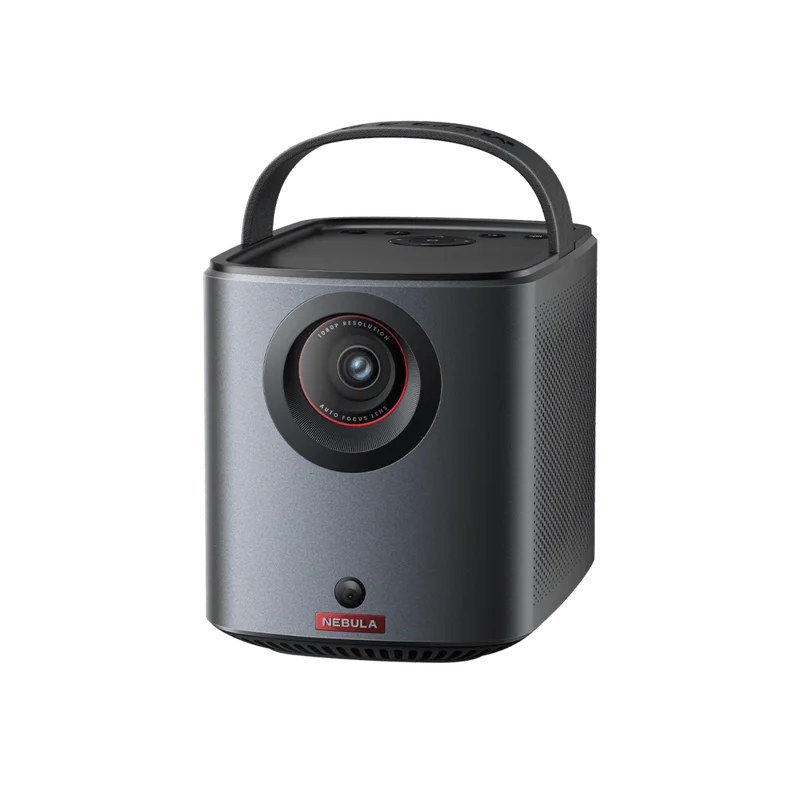
The World’s First Long-Lasting Google TV Projector with Built-In Netflix
Features
-
Take the Big Screen Anywhere: This portable Google TV projector lets you watch all of your favorite content and apps—including Netflix—wherever you are.
-
Jaw-Dropping Display: Enjoy a truly cinematic experience with rich detail and high clarity thanks to the 1080p HDR display and 400 ANSI Lumens of brightness.
-
Ultra-Long Playback: Fully charge to enjoy watching up to 2.5 hours of movies and series, or listen to up to 8 hours of music.
-
Dual 8W Dolby Audio: Delivers immersive sound for movies, and can even function as a portable speaker to pump out the music at a party.
-
Set Up in Seconds Our Intelligent Environment Adaptation Technology performs screen fit, auto keystone correction, autofocus, and obstacle avoidance in just 3 seconds.
Specifications
| Model Number | D2325 |
|---|---|
| Size | 178*122*133mm |
| Color | Black |
| Weight | 1.7kg |
| Display | Display Technology: DLP 0.23″ DMD Resolution: 1920×1080 Brightness:400 Ansi Lumens Lightsource Life: 30,000 hrs Aspect Ratio: 16:9 Throw Ratio 1:2:1 offset 100% Focus Adjustment: Auto Projection Mode front/rear/Front Ceiling/Rear Ceiling Keystone Correction Auto Vertical, +-40 degree), Auto (horizontal +-40 degree) Interface: HDMI / USB-C / USB-A AUX |
| Software | OS: Google TV Working Modes: Projector Mode, Bluetooth Speaker Mode OTA: Supported App Store Supported Google Play Movie Playtime:2.5 hours in battery Mode Music Playtime 8 hrs in Bluetooth Speaker mode Charging time: 3 hrs with 19V/4.74A DC-IN |
| Hardware | CPU: Quad-Core ARM Cortex-A53 CPU GPU G52MCI RAM 2GB DDR ROM: 16 GB eMMC Battery 64.8wh Speaker: 2*8W Wi Fl 802.11a/b/g/n/ac, Dual Frequency 2.4/5GHz Bluetooth: 5.1 Fan: Under 28dB |
| Control | Physical Buttons: Power/Volume/D-Pad/Back/Mode Switch IR Remete: D-Pad Mode BT Remote App: Android and ioS |
Package Includes
-
Mars 3 air
-
Adapter
-
Power Cable
-
QSG
-
2xAAA Batteries
-
Remote Control
What Our Experts Think
- Compact & Portable: Ultra-lightweight design with a built-in handle, making it easy to take on camping trips, outdoor movie nights, or room-to-room use.
- Google TV Integration: Access a wide range of streaming apps, live TV, and movies with the smart functionality of Google TV built right in.
- Bright & Clear Picture: Provides sharp HD projections with impressive brightness, ensuring excellent viewing quality even in semi-lit environments.
- Long Battery Life: Features extended battery performance, offering hours of playtime for uninterrupted entertainment on the go.
- All-in-One Solution: Includes built-in speakers delivering immersive sound, eliminating the need for external audio equipment.
- Expert Recommendation: Perfect for movie lovers and adventurers seeking a smart, portable projector with top-notch visuals, audio, and streaming convenience
Q&A
Q: What is the Nebula Mars 3 Air Portable Google TV Projector?
A: The Nebula Mars 3 Air (D2325111) is a compact, portable projector with Google TV functionality, offering seamless access to streaming apps and high-quality visuals.
Q: What is its resolution and brightness?
A: The Mars 3 Air provides crisp 1080p Full HD resolution and bright projection, making it suitable for use in various lighting conditions.
Q: Does it have built-in streaming capabilities?
A: Yes, with Google TV integration, you can stream content from apps like Netflix, YouTube, Disney+, and more directly from the device.
Q: Is it easy to carry and use outdoors?
A: Absolutely, the Mars 3 Air is lightweight and portable, with a built-in battery for up to 3 hours of viewing, making it perfect for outdoor movie nights.
Q: How is the sound quality?
A: It features high-quality built-in speakers that provide immersive audio, eliminating the need for external sound systems.
Maintenance Tips
- Clean the Lens: Use a microfiber cloth to gently clean the lens to prevent scratches and maintain image clarity.
- Ensure Proper Ventilation: Keep the vents unobstructed and dust-free to avoid overheating during use.
- Avoid Extreme Conditions: Protect the projector from direct sunlight, high humidity, and extreme temperatures to maintain performance.
- Update Firmware: Regularly check for firmware updates to access the latest features and improvements.
- Store Safely: When not in use, store the projector in a cool, dry place, ideally in a protective case.
- Power Off Properly: Use the power button to shut down the device instead of unplugging it abruptly.
- Handle with Care: Avoid dropping or mishandling the device to prevent internal or external damage.
- Protect the Ports: Inspect and clean the ports as needed, and gently connect/disconnect cables to prevent wear
Reviews
There are no reviews yet.